Booking options
£65

£65
Free access available with a membership.
Log in if you have a membership or view memberships to find out more.
On-Demand workshop
6 hours
All levels
(ONLINE ON-DEMAND COURSE)
This is Resource 4 in a series of textile resources created for primary teachers.
The aim of this introductory course is to give pupils their first experience of digital textiles through a mix of fun, hands-on activities and creative learning.
Pupils will explore what digital textiles are and how to create them, while also making links to everyday life, careers, and creativity.
The resource includes:
Repeat pattern methods- Understanding a block, half drop and mirror repeat.
Practical activity-Creating a digital repeat patterns, layering and inserting into shapes
Worksheets and games to support learning
Spotlights on artists, designers, and careers in textiles
Cultural, cross curricular and sustainability links
Equipment needed and health & safety
Reflect and recall sheets to consolidate knowledge
By the end of this course, pupils will have developed a understanding of digital textiles and the role they play in our lives, as well as enjoyed creative opportunities to experiment with digital designing.

Introduce pupils to computer aided design (CAD) in textiles.
Develop the skills to create repeat patterns using PowerPoint,
Build confidence in digital design techniques and processes.
Prepare pupils for future careers in the creative and digital textile design industries.
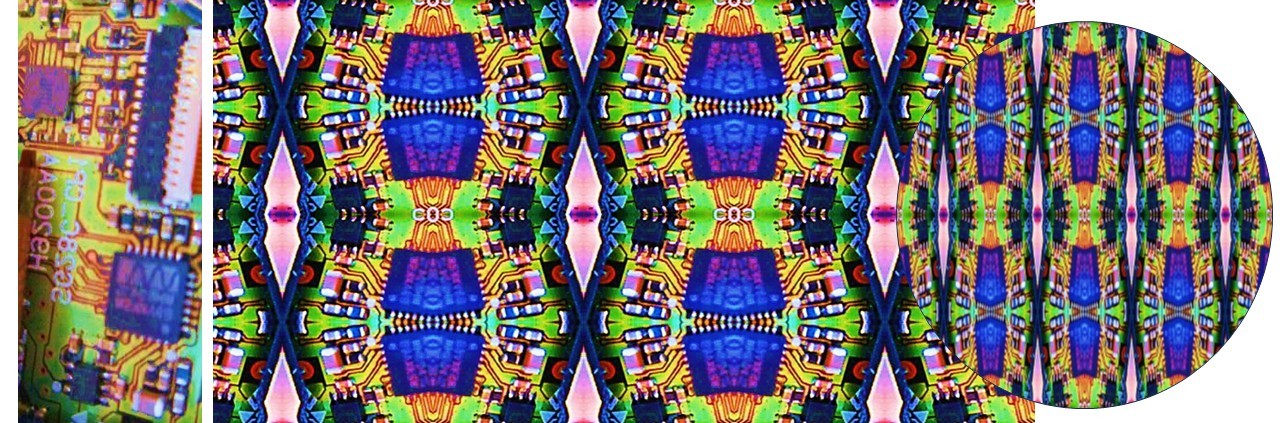
1: Creating a digital repeat pattern using images from the internet
2: Creating repeat patterns using pupil’s own images.
3: Layering images-adding another dimension to you designs
4: Inserting repeat patterns or images into shapes

This resource is designed for any primary school teacher who would like to introduce pupils to digital textiles. While it is not curriculum-specific, the activities can be used to support both the Art & Design and Design & Technology curriculum, with a clear focus on textiles.
Practice first: It’s recommended that teachers try out the activities themselves before delivering them in class.
Flexible use: The resources are designed in a sequence, but you can dip into them in any order depending on your pupils’ needs.
Timing: There are no strict time limits—teachers can choose to deliver a single activity, or take a resource through its full progression with a class.
Stage, not age: The resources are built on the principle of meeting pupils where they are in their learning journey. Teachers may wish to check pupils’ prior knowledge before starting.
Resource plan
Careers in printed & Digital Textiles
Tutorial 1-Using the picture format tool bar
Repeat pattern methods- Understanding a block, half drop and mirror repeat.
Tutorial 2-Creating repeat patterns with images from the internet
Tutorial 3- Creating repeat patterns with your own images
Tutorial 4-Layering images
Tutorial 5-inserting repeat patterns into shapes
Designers for inspiration
Games for learning
Reflect & Recall